
Learning this addon is the single biggest thing you can do if you want to make more gold in WoW. TradeSkillMaster can seem quite complex on first look, but I will help you demystify it and anyone can learn to use it!
The tooltip
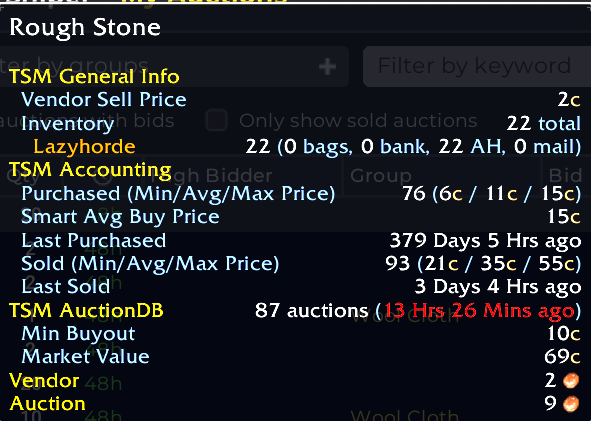
One of the absolute best features of TradeSkillMaster is the pricing data. If you install the desktop APP you will automatically get pricing data showing up on your item tooltips. You can even customize what is shown which includes crafting cost breakdowns, disenchanting values and a lot of other useful things. Having easy access to prices will help immensely on making decisions, even if you just use auctionator to post and buy auctions. That being said you should go farther.
Groups and operations
TradeSkillMaster works on the basis of two concepts. Groups and operations. A group is a group of items. Operations are rules that are applied to a group to decide what you do with it. TSM has a lot of different operation types, you can set rules for buying items, posting auctions, mailing items around and for which items to craft.
The general idea is to put items that you want to treat the same way in the same group so that they use the same operations. As an example if you are crafting gear all of them should have a crafting operation that tells you to craft the item if it is profitable, usually you want just 1 of each for gear. Then you need a mailing operation to send the gear from your various crafters to an AH Alt. Lastly you want an auctioning operation that ensures that you make a profit on your minimum price and that you post 1 item for some duration.
I’ll now go a bit more into detail on operations.
Auctioning operations
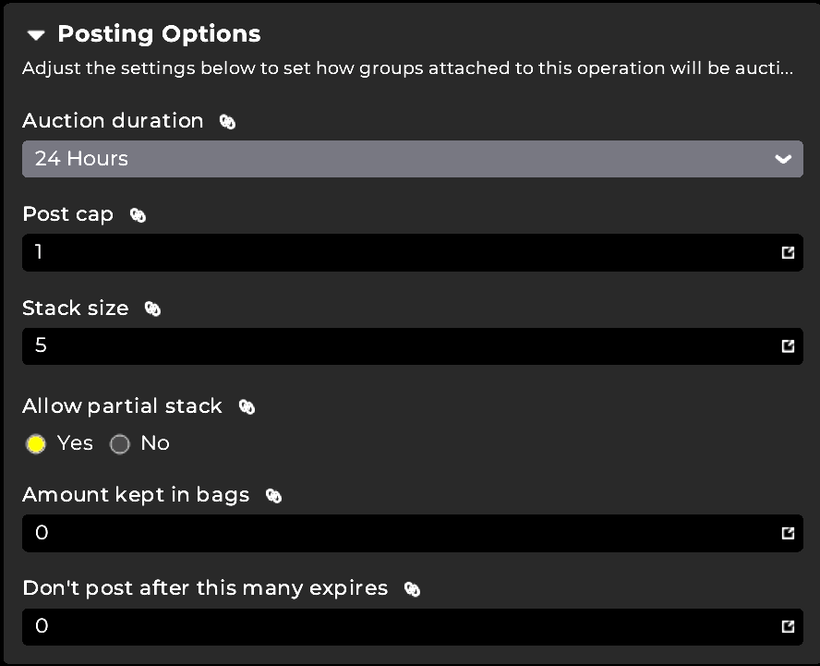
Auctioning operations are the most important ones. These save you an absolute beast of a time. You set the rules for a group for how auctions are posted. In classic you decide both the number of stacks and the stack size and you can have multiple operations. For instance my material flipping groups use 3 different stack sizes and thus 3 different operations.
After the quantity you decide the duration, which depends on the market and server. If competition is very high 12 hours is best, if it is lower you can consider longer post times.
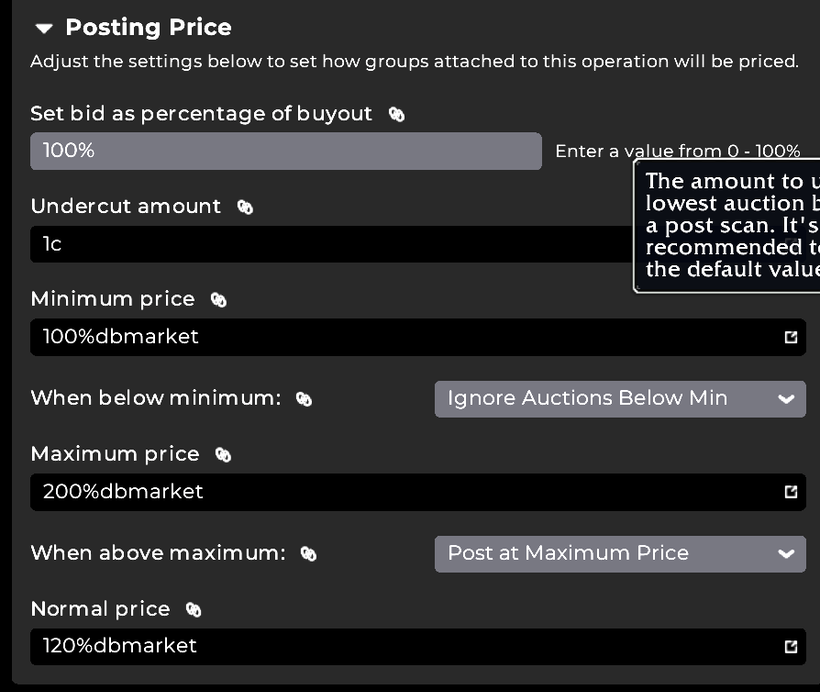
Then there are three prices you need to enter, a minimum a maximum and a normal price. You can then also pick what you want to do if the price is above maximum or below minimum. All the price cells can and should contain a formula rather than a raw gold value. You can type 100g, but then you would need 1 operation for each item and update them every day. In stead use the build in value sources. Dbmarket is the market value of an item and crafting is the crafting cost of an item. You can usually get by with just these two. For crafted items all my operations use crafting for every price. Minimum price is usually between 115% and 130% crafting depending on the market. Normal price is 200-500% crafting and maximum price is 500%-3000%crafting. If the price is below minimum then I set it to don’t post if it is a high deposit item (like crafted gear), or post at minimum if it is a high volume stackable like potions or flasks. For prices above maximum I post at maximum.
Now do a post scan
Once you’ve done this you can now post your auctions with a post scan. In stead of entering every item into the AH UI by dragging it, looking at prices and then setting the price you have defined the rules. When you do a post scan TSM will check the current price of the item and then fill out the auctioning UI and you can just click the post button or bind the TSM macro to your scrollwheel and just spam the macro until all your items have been posted.
Coming back after a ~5 year hiatus, I’m happy to see that you’re still making content, as your guides were super helpful when I was first learning TSM.
Question that I can’t seem to find an answer to: since TSM no longer supports manually scanning the AH and TSM’s Realm data lags behind an hour or two, do you recommend downloading another addon (i.e. Auctionator) to scan for live data?
If so, what’s the best way to incorporate both data sources (Auctionator’s manual-scan data and TSM’s realm data) together in your TSM strings?
Additionally, do you have any recommendations for combating TSM’s “Great Deals” flagging blatantly manipulated AH listings?
(I commented this on an older post as well for visibility.)
Commenting as this is a super useful question. If the data is out of date it’s going to be much less effective
i used TSM already in the past. but i cant get it running correclty in TBC right now.
I cant create auctions, it just says “repeat failed auctions” also the create scans took 20seconds for each item. is it me, or isnt in working correctly?